
Substitute teacher management
Fill a teacher absence before the first bell.
Replace the morning phone tree. AulaSubs texts your qualified substitutes, confirms the first one to accept, and keeps your front office posted until they walk in.
- No app for substitutes
- One confirmed per absence
- Opt-outs handled for you
AulaSubs alerts
6:12 AM
AulaSubs: Westbrook Academy needs Mathematics on Tue, Mar 12 (8:00 AM – 3:00 PM). Reply ACCEPT 1042 to claim or DECLINE 1042.
ACCEPT 1042
Confirmed! You are scheduled for Mathematics at Westbrook Academy on Tue, Mar 12. Details: www.aulasubs.com/a/…
Reminder: Assignment 1042 starts today at 8:00 AM. Reply HERE upon arrival at main office.
HERE
How it works
Three steps, from the call-in to the check-in.
1. Report the absence
Enter the class, the time and any certification it needs. AulaSubs finds the substitutes who qualify and texts them in seconds.
2. The first to accept gets it
Substitutes reply ACCEPT from any phone. One is confirmed and sent the assignment details. Anyone who replies later is told the job is taken.
3. Know they've arrived
Reminders go out on the day. The substitute replies HERE at the main office and your roster shows them on site.
Everything you need to cover every class
Built around the way schools actually find substitutes: early mornings, short notice and a phone in every pocket.
Find the right substitute, fast
Only people who can actually take the class are asked, in the order you choose.
Matching that respects your rules
Each absence is matched by subject, required certification, the days a substitute works and the tier you gave them. Inactive substitutes are skipped.
Broadcast or tier by tier
Text every eligible substitute at once, or start with your preferred tier and move to the next one after the number of minutes you set.
Escalate on your terms
Nobody answering? Contact the next tier straight away from the absence page instead of waiting for the timer.
No double-booking
Exactly one substitute is confirmed per absence, even when several reply at the same moment, and nobody is booked into two classes at the same time.
Texting that substitutes answer
Substitutes don't need an app or a password. Everything works by plain SMS.
Reply with one word
Every offer carries a short assignment code. Substitutes reply ACCEPT or DECLINE with that code, and get a clear answer back.
A secure details link
The confirmed substitute gets a private link with the address, arrival protocol, parking, room and lesson plan. It opens on one device and expires after the assignment.
Reminders on the day
A good-morning reminder at 6:30 AM school time, then a check-in prompt an hour before the class starts.
HERE check-in
The substitute replies HERE on arrival at the main office, and the roster updates for everyone watching it.
Your front office, always informed
One screen shows what is covered, what isn't, and who is in the building.
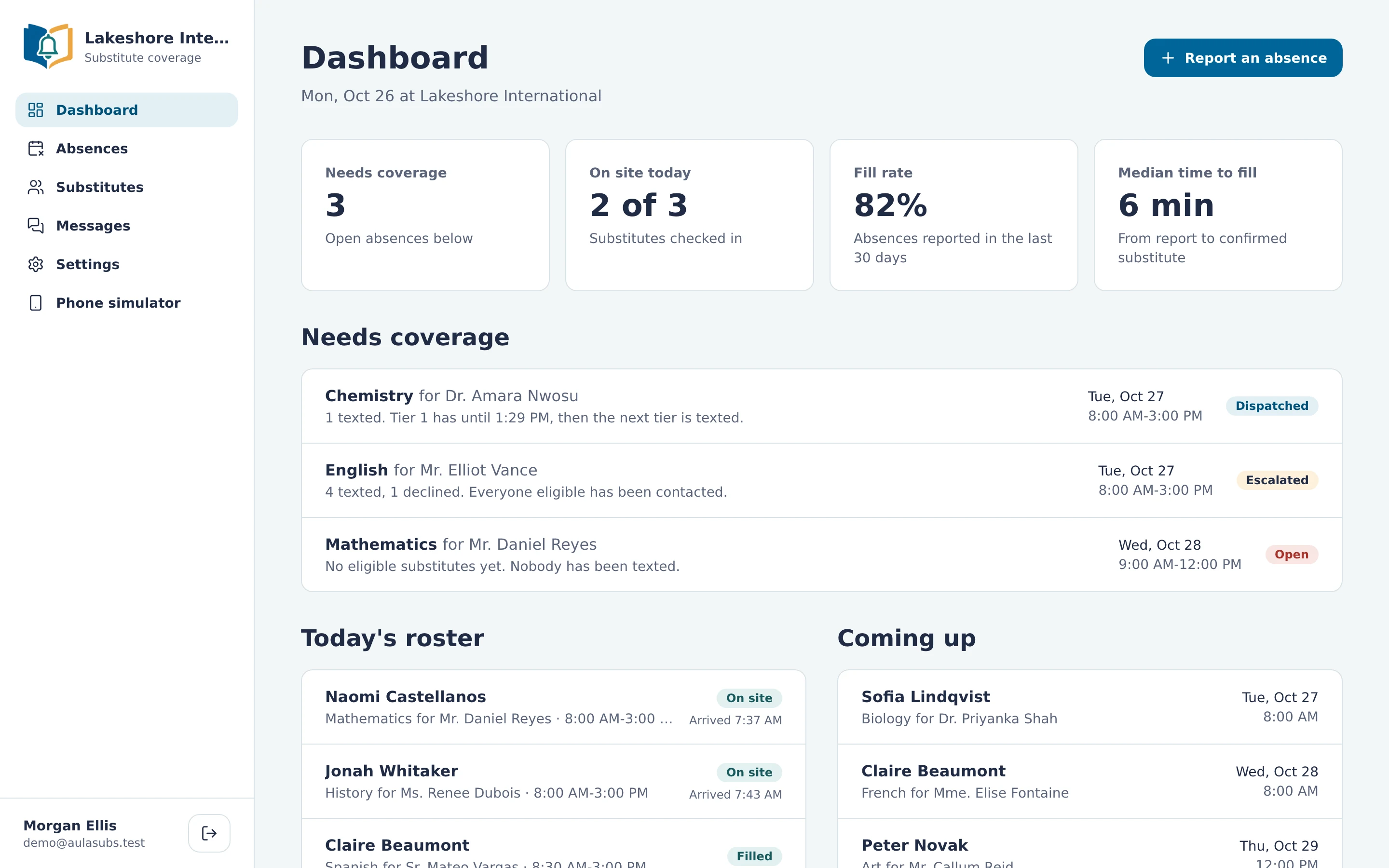
Live coverage dashboard
See absences that still need coverage, today's roster with who is on site, and what is coming up. Fill rate and median time to fill are tracked over the last 30 days.
A full history for every absence
Every offer, reply and reminder is logged against the absence, with the carrier's delivery receipt for each text.
Plans change, people are told
Cancel an absence or release a substitute, and anyone affected is texted automatically. The absence can be reopened and sent out again.
Try it without sending a text
The built-in phone simulator shows each substitute's phone so your team can practise the whole workflow before going live.
Compliance and reliability built in
The rules for business texting are handled for you.
Opt-outs honoured automatically
STOP, START and HELP work for every number. Opted-out numbers are checked before any text is sent, not after.
Email when a text can't get through
If the carrier reports that a number is a landline or can't be reached, the message is sent by email instead and the number is flagged.
Sent within carrier limits
Outgoing texts are paced to the carrier's throughput limit and retried if a send fails, so nothing is dropped during a busy morning.
Six words substitutes need to know
Replies aren't case sensitive, and anything AulaSubs can't read gets a friendly reply explaining what to send instead.
- ACCEPT 1042
- Claim assignment 1042. The first valid reply wins it.
- DECLINE 1042
- Pass on assignment 1042.
- HERE
- Check in on arrival at the main office.
- STOP
- Stop all AulaSubs texts to this number.
- START
- Resubscribe after STOP.
- HELP
- Get a reminder of the commands.
Pricing
One plan with every feature included.
AulaSubs for schools
Tell us about your school and we'll put together a quote that fits.
- Unlimited absences and substitutes
- Broadcast and tier-by-tier dispatch
- SMS offers, confirmations, reminders and HERE check-in
- Secure assignment details links
- Live coverage dashboard and message history
- Opt-out handling and email failover
- Phone simulator for training your team
Not sure what you need? We'll help you work it out and show you a demo.
Frequently asked questions
Do substitutes need to install an app?
No. Substitutes use the text messaging already on their phone. They reply ACCEPT, DECLINE or HERE, and open the assignment details link in their browser.
What happens if two substitutes accept at the same time?
Exactly one is confirmed. The claim is made in a single step that only one reply can win, and everyone else who replied is told the assignment has already been claimed.
Can we decide who gets asked first?
Yes. Give each substitute a tier and choose tier-by-tier dispatch. AulaSubs texts your first tier, then moves to the next after the number of minutes you set. You can also text everyone eligible at once.
What if a substitute's number can't receive texts?
When the carrier reports a landline or an unreachable number, AulaSubs sends the same message by email, if you have one on file, and flags the number on the substitute's profile.
How do substitutes stop receiving messages?
They reply STOP. The number goes on the opt-out list, which is checked before every text. Replying START resubscribes them.
Can we try AulaSubs before texting real substitutes?
Yes. The phone simulator lets you report an absence and reply as any of your substitutes, without a single text leaving the building.
See AulaSubs fill an absence in a few minutes.
We'll walk through it with your own school's setup.